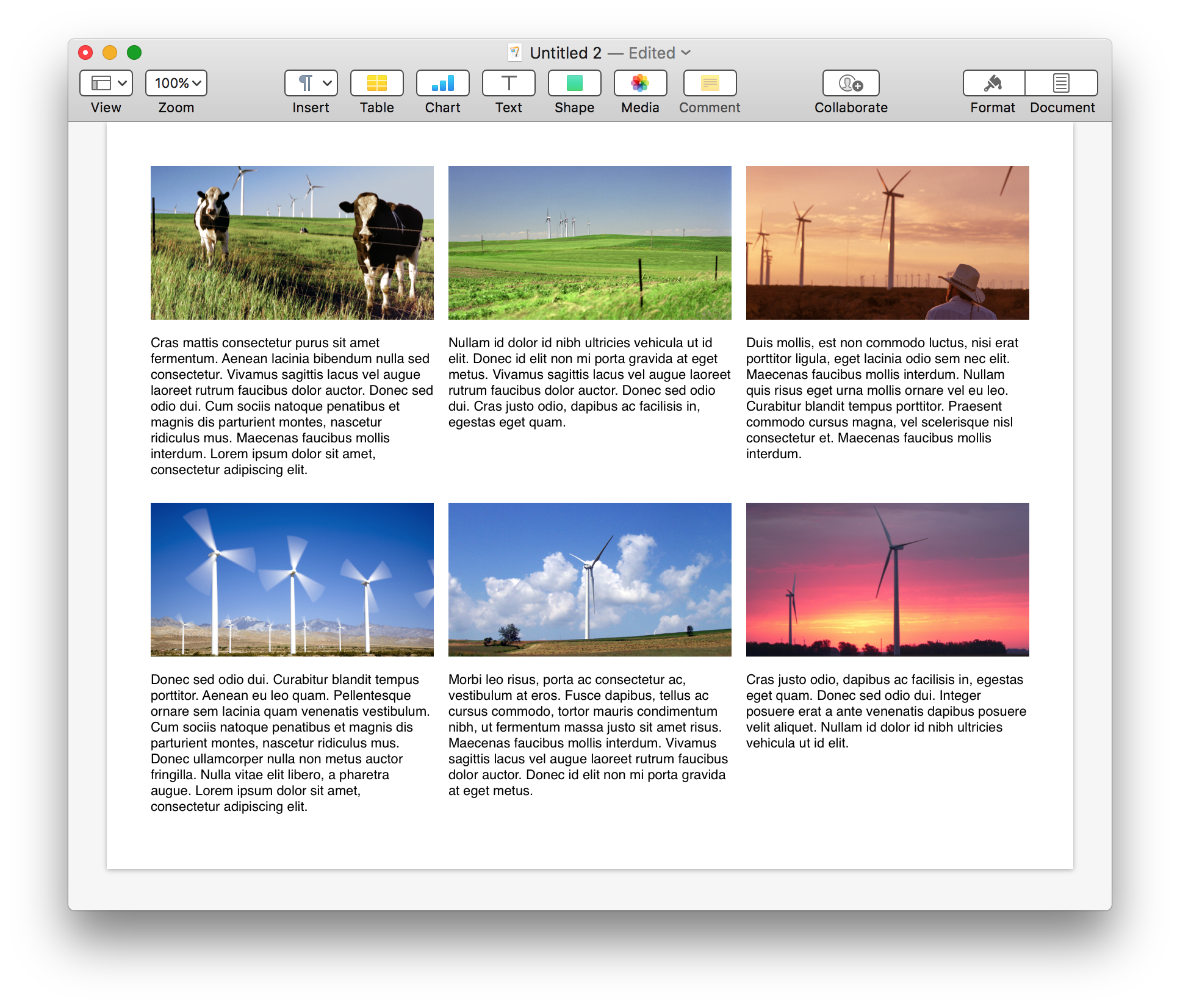
Grid-based design is a standard format of page layout used for documents that display numerous individualized items, such as catalogs.
Here’s a script that can quickly create a grid of page items (text boxes and/or image placeholders), and even insert text identifiers into the created text items or into the image descriptions.
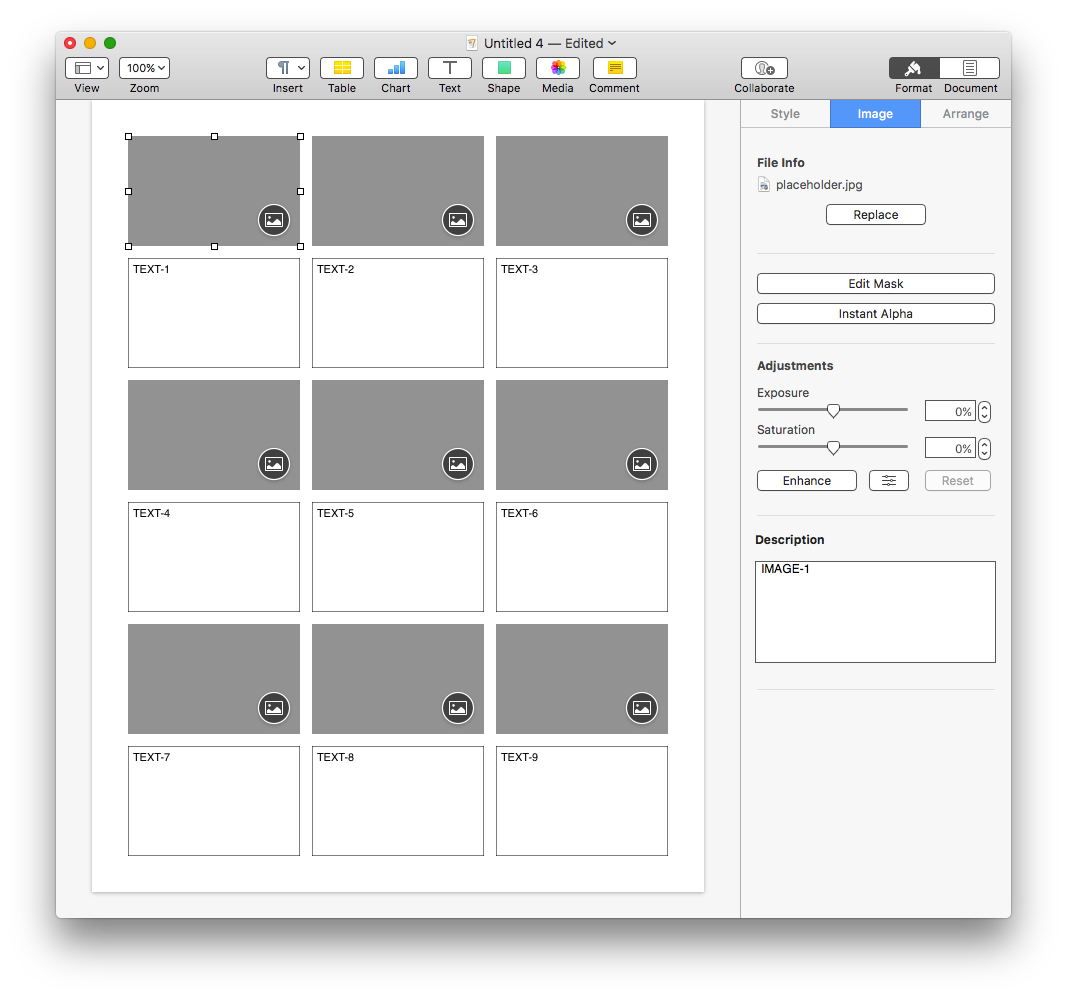
DO THIS ►DOWNLOAD a Pages template file of the example shown above. NOTE: when using a document created with the template, add new pages by duplicating the first page.
Here’s the script. Click the button to open it in the Script Editor application where you can run it or save it to the system-wide Script Menu. It is written using AppleScriptObj-C (note the frameworks declared at the top of the script) and actually creates custom-sized placeholder images dynamically!
| Create a Grid of Page Items | ||
| Open in Script Editor | ||
| 01 | use AppleScript version "2.3.1" | |
| 02 | use scripting additions | |
| 03 | use framework "Foundation" | |
| 04 | use framework "AppKit" | |
| 05 | use framework "CoreImage" | |
| 06 | ||
| 07 | property defaulttopMarginHeight : 36 | |
| 08 | property defaultbottomMarginHeight : 36 | |
| 09 | property defaultleftMarginWidth : 36 | |
| 10 | property defaultrightMarginWidth : 36 | |
| 11 | property defaultcolumnGutterWidth : 12 | |
| 12 | property defaultrowGutterHeight : 12 | |
| 13 | property defaultColumnCount : 3 | |
| 14 | property defaultRowCount : 6 | |
| 15 | ||
| 16 | property paperSizeNames : {"US Letter", "US Legal", "A3", "A4", "A5", "JIS B5", "B5", "Envelope #10", "Envelope DL", "Tabloid", "Tabloid Oversize", "ROC 16K", "Envelope Choukei 3", "Super B/A3"} | |
| 17 | property paperSizeDimensions : {{612, 792}, {612, 1008}, {842, 1191}, {595, 842}, {420, 595}, {516, 729}, {499, 709}, {297, 684}, {312, 624}, {792, 1224}, {864, 1296}, {558, 774}, {340, 666}, {936, 1368}} | |
| 18 | ||
| 19 | tell application id "com.apple.iWork.Pages" | |
| 20 | activate | |
| 21 | ||
| 22 | if not (exists document 1) then error number -128 | |
| 23 | ||
| 24 | set paperSizePrompt to "What is this document’s paper size?" | |
| 25 | set chosenPageSize to (choose from list paperSizeNames with prompt paperSizePrompt default items (item 1 of paperSizeNames)) | |
| 26 | if chosenPageSize is false then error number -128 | |
| 27 | set chosenPageSize to chosenPageSize as string | |
| 28 | set thisPageDimensions to item (my indexOfItemInList(chosenPageSize, paperSizeNames)) of paperSizeDimensions | |
| 29 | ||
| 30 | set orientationPrompt to "Is the page orientation set to landscape or portrait?" | |
| 31 | display dialog orientationPrompt buttons {"Cancel", "Landscape", "Portrait"} default button 3 | |
| 32 | if the button returned of the result is "Landscape" then | |
| 33 | set thisPageDimensions to the reverse of thisPageDimensions | |
| 34 | end if | |
| 35 | ||
| 36 | copy thisPageDimensions to {documentWidth, documentHeight} | |
| 37 | ||
| 38 | set objectTypePrompt to "Do you want to create just images, just text items, or both image and text items as pairs?" | |
| 39 | display dialog objectTypePrompt buttons {"Images", "Text Items", "Both"} default button 3 | |
| 40 | set the objectType to the button returned of the result | |
| 41 | ||
| 42 | set topMarginPrompt to "Enter the size of the TOP page margin to use (in pixels):" | |
| 43 | set topMarginHeight to my promptForIntegerValue(topMarginPrompt, 0, documentHeight div 2, defaulttopMarginHeight) | |
| 44 | ||
| 45 | set bottomMarginPrompt to "Enter the size of the BOTTOM page margin to use (in pixels):" | |
| 46 | set bottomMarginHeight to my promptForIntegerValue(bottomMarginPrompt, 0, documentHeight div 2, defaultbottomMarginHeight) | |
| 47 | ||
| 48 | set leftMarginPrompt to "Enter the size of the LEFT page margin to use (in pixels):" | |
| 49 | set leftMarginWidth to my promptForIntegerValue(leftMarginPrompt, 0, documentHeight div 2, defaultleftMarginWidth) | |
| 50 | ||
| 51 | set rightMarginPrompt to "Enter the size of RIGHT page margin to use (in pixels):" | |
| 52 | set rightMarginWidth to my promptForIntegerValue(rightMarginPrompt, 0, documentHeight div 2, defaultrightMarginWidth) | |
| 53 | ||
| 54 | set columnGutterPrompt to "Enter the space between columns (in pixels):" | |
| 55 | set columnGutterWidth to my promptForIntegerValue(columnGutterPrompt, 0, 100, defaultcolumnGutterWidth) | |
| 56 | ||
| 57 | set rowGutterPrompt to "Enter the space between rows (in pixels):" | |
| 58 | set rowGutterHeight to my promptForIntegerValue(rowGutterPrompt, 0, 100, defaultrowGutterHeight) | |
| 59 | ||
| 60 | set columnCountPrompt to "Enter the column count:" | |
| 61 | set columnCount to my promptForIntegerValue(columnCountPrompt, 2, 20, defaultColumnCount) | |
| 62 | ||
| 63 | if objectType is "Both" then | |
| 64 | set rowCountForBothPrompt to "Since you’ve chosen to create paired image and text rows, enter the total row count (including both image and text rows):" & return & return & "(This value must be an even number)" | |
| 65 | repeat | |
| 66 | set rowCount to my promptForIntegerValue(rowCountForBothPrompt, 2, 20, defaultRowCount) | |
| 67 | if rowCount mod 2 is 0 then | |
| 68 | exit repeat | |
| 69 | else | |
| 70 | beep | |
| 71 | end if | |
| 72 | end repeat | |
| 73 | else | |
| 74 | set rowCountPrompt to "Enter the row count:" | |
| 75 | set rowCount to my promptForIntegerValue(rowCountPrompt, 2, 20, defaultRowCount) | |
| 76 | end if | |
| 77 | ||
| 78 | set pageIdentiferPrompt to "Do you want add identifiers to the page items?" | |
| 79 | display dialog pageIdentiferPrompt buttons {"Cancel", "No", "Yes"} default button 3 | |
| 80 | if (the button returned of the result) is "Yes" then | |
| 81 | set shouldAddID to true | |
| 82 | else | |
| 83 | set shouldAddID to false | |
| 84 | end if | |
| 85 | ||
| 86 | set columnGutterCount to columnCount - 1 | |
| 87 | set rowGutterCount to rowCount - 1 | |
| 88 | ||
| 89 | set editableAreaWidth to documentWidth - leftMarginWidth - rightMarginWidth | |
| 90 | set editableAreaHeight to documentHeight - topMarginHeight - bottomMarginHeight | |
| 91 | ||
| 92 | set editableColumnAreaWidth to editableAreaWidth - (columnGutterCount * columnGutterWidth) | |
| 93 | set editableRowAreaHeight to editableAreaHeight - (rowGutterCount * rowGutterHeight) | |
| 94 | ||
| 95 | set shapeWidth to editableColumnAreaWidth div columnCount | |
| 96 | set shapeHeight to editableRowAreaHeight div rowCount | |
| 97 | ||
| 98 | set targetImageFilePath to the POSIX path of (path to pictures folder) & "placeholder.jpg" | |
| 99 | my createCustomPlaceholderImageFile(shapeWidth, shapeHeight, targetImageFilePath, false) | |
| 100 | set targetImageFile to targetImageFilePath as POSIX file | |
| 101 | ||
| 102 | tell document 1 | |
| 103 | tell current page | |
| 104 | set thisHorizontalOffset to leftMarginWidth | |
| 105 | set thisVerticalOffset to topMarginHeight | |
| 106 | set itemCounter to 0 | |
| 107 | set textItemCount to 0 | |
| 108 | set imageItemCount to 0 | |
| 109 | repeat with i from 1 to rowCount | |
| 110 | repeat with q from 1 to columnCount | |
| 111 | if the objectType is "Images" then | |
| 112 | set itemCounter to itemCounter + 1 | |
| 113 | set placeholderText to "PLACEHOLDER-" & (itemCounter as text) | |
| 114 | set thisImage to make new image with properties {file:targetImageFile, width:shapeWidth, height:shapeHeight, position:{thisHorizontalOffset, thisVerticalOffset}, description:placeholderText} | |
| 115 | delay 0.5 | |
| 116 | tell application "System Events" to keystroke "i" using {control down, command down, option down} | |
| 117 | delay 0.5 | |
| 118 | else if the objectType is "Text Items" then | |
| 119 | if shouldAddID is true then | |
| 120 | set itemCounter to itemCounter + 1 | |
| 121 | set placeholderText to "PLACEHOLDER-" & (itemCounter as text) | |
| 122 | else | |
| 123 | set placeholderText to "" | |
| 124 | end if | |
| 125 | make new text item with properties {width:shapeWidth, height:shapeHeight, position:{thisHorizontalOffset, thisVerticalOffset}, object text:placeholderText} | |
| 126 | else if the objectType is "Both" then | |
| 127 | if i mod 2 is 0 then -- even row is text items | |
| 128 | if shouldAddID is true then | |
| 129 | set textItemCount to textItemCount + 1 | |
| 130 | set placeholderText to "TEXT-" & textItemCount as text | |
| 131 | else | |
| 132 | set placeholderText to "" | |
| 133 | end if | |
| 134 | make new text item with properties {width:shapeWidth, height:shapeHeight, position:{thisHorizontalOffset, thisVerticalOffset}, object text:placeholderText} | |
| 135 | else -- odd row is images | |
| 136 | if shouldAddID is true then | |
| 137 | set imageItemCount to imageItemCount + 1 | |
| 138 | set placeholderText to "IMAGE-" & imageItemCount as text | |
| 139 | else | |
| 140 | set placeholderText to "" | |
| 141 | end if | |
| 142 | set thisImage to make new image with properties {file:targetImageFile, width:shapeWidth, height:shapeHeight, position:{thisHorizontalOffset, thisVerticalOffset}, description:placeholderText} | |
| 143 | if shouldAddID is true then set description of thisImage to placeholderText | |
| 144 | delay 0.5 | |
| 145 | tell application "System Events" to keystroke "i" using {control down, command down, option down} | |
| 146 | delay 0.5 | |
| 147 | end if | |
| 148 | end if | |
| 149 | set thisHorizontalOffset to thisHorizontalOffset + columnGutterWidth + shapeWidth | |
| 150 | end repeat | |
| 151 | set thisHorizontalOffset to leftMarginWidth | |
| 152 | set thisVerticalOffset to thisVerticalOffset + rowGutterHeight + shapeHeight | |
| 153 | end repeat | |
| 154 | end tell | |
| 155 | end tell | |
| 156 | end tell | |
| 157 | tell application id "com.apple.Finder" to move targetImageFile to the trash | |
| 158 | ||
| 159 | on promptForIntegerValue(thisPrompt, minimumValue, maximumValue, defaultValue) | |
| 160 | tell application id "com.apple.iWork.Pages" | |
| 161 | repeat | |
| 162 | display dialog thisPrompt default answer (defaultValue as string) | |
| 163 | try | |
| 164 | set thisValue to (the text returned of the result) as integer | |
| 165 | if thisValue is greater than or equal to minimumValue and thisValue is less than or equal to maximumValue then | |
| 166 | return thisValue | |
| 167 | end if | |
| 168 | on error | |
| 169 | beep | |
| 170 | end try | |
| 171 | end repeat | |
| 172 | end tell | |
| 173 | end promptForIntegerValue | |
| 174 | ||
| 175 | on indexOfItemInList(aValue, theList) | |
| 176 | set theArray to current application's NSArray's arrayWithArray:theList | |
| 177 | set theIndex to theArray's indexOfObject:aValue | |
| 178 | return (theIndex + 1) | |
| 179 | end indexOfItemInList | |
| 180 | ||
| 181 | on createCustomPlaceholderImageFile(aWidth, aHeight, targetImageFilePath, shouldReveal) | |
| 182 | set aColor to current application's NSColor's grayColor | |
| 183 | set aSize to {width:aWidth, height:aHeight} | |
| 184 | set aRect to current application's NSMakeRect(0, 0, aWidth, aHeight) | |
| 185 | set aImage to current application's NSImage's alloc()'s initWithSize:aSize | |
| 186 | aImage's lockFocus() | |
| 187 | aColor's drawSwatchInRect:aRect | |
| 188 | aImage's unlockFocus() | |
| 189 | set aResult to writeNSImageObjectToFileAsJPEG(aImage, targetImageFilePath, shouldReveal) | |
| 190 | return aResult | |
| 191 | end createCustomPlaceholderImageFile | |
| 192 | ||
| 193 | on writeNSImageObjectToFileAsJPEG(thisImageObject, targetImageFilePath, shouldRevealInFinder) | |
| 194 | -- create JPEG data for the image object | |
| 195 | set tiffData to thisImageObject's TIFFRepresentation() | |
| 196 | set imageRep to current application's NSBitmapimageRep's imageRepWithData:tiffData | |
| 197 | set theProps to current application's NSDictionary's dictionaryWithObject:1.0 forKey:(current application's NSImageCompressionFactor) | |
| 198 | set imageData to (imageRep's representationUsingType:(current application's NSJPEGFileType) |properties|:theProps) | |
| 199 | ||
| 200 | -- write the JPEG data to file | |
| 201 | set theResult to (imageData's writeToFile:targetImageFilePath atomically:true |error|:(missing value)) as boolean | |
| 202 | if theResult is true then | |
| 203 | if shouldRevealInFinder is true then | |
| 204 | set theseURLs to {} | |
| 205 | set the end of theseURLs to (current application's NSURL's fileURLWithPath:targetImageFilePath) | |
| 206 | -- reveal items in file viewer | |
| 207 | tell current application's NSWorkspace to set theWorkspace to sharedWorkspace() | |
| 208 | tell theWorkspace to activateFileViewerSelectingURLs:theseURLs | |
| 209 | end if | |
| 210 | return true | |
| 211 | else | |
| 212 | error "There was a problem writing the image object to file." | |
| 213 | end if | |
| 214 | end writeNSImageObjectToFileAsJPEG | |
(⬇ see below ) Vertical grid of image and text pairings
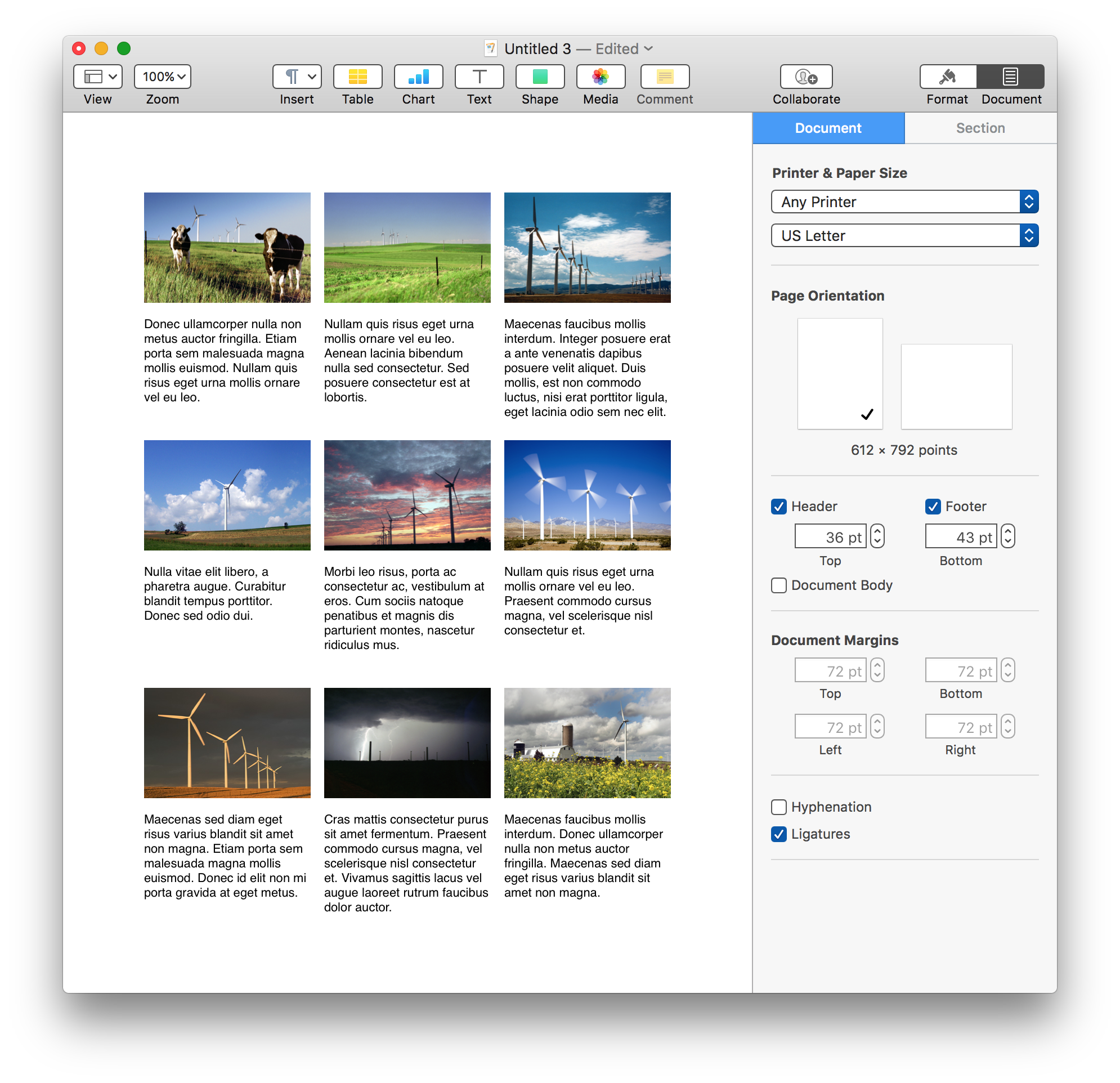
NOTE: (⬆ see above ) Be sure to disable word-processing mode by deselecting the “Document Body” option checkbox in the Document tab on the right side of the window.
(⬇ see below ) Horizontal grid of image and text pairings